Preview LinkedIn posts before you publish
(free, no login)
See how your post renders on mobile & desktop—line breaks, the "see more" cut, links, and emoji spacing. Share one review link with your colleague, manager, or brand POC, collect feedback in-place, and publish without losing formatting.



Preview Your LinkedIn Post Before It Goes Live
Watch a quick demo of how formatting, previews, and generating shareable links work together in one smooth workflow.
See the full flow in action
From rich formatting to mobile/desktop previews and saving drafts with shareable links, get a quick walkthrough of our LinkedIn post preview tool.
All Formatting Options Available
Create professional, engaging LinkedIn posts with our comprehensive formatting tools. Preview exactly how your content will appear before publishing.
Mobile & Desktop Preview
See exactly how your LinkedIn post will appear on both mobile and desktop devices before publishing.
Mobile Preview
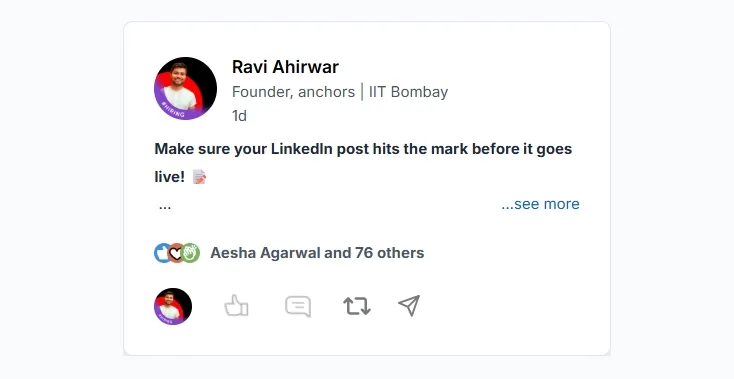
Optimize your hook for mobile screens where most LinkedIn users browse. See exactly where the "see more" truncation occurs and ensure your key message is visible above the fold.
Desktop Preview
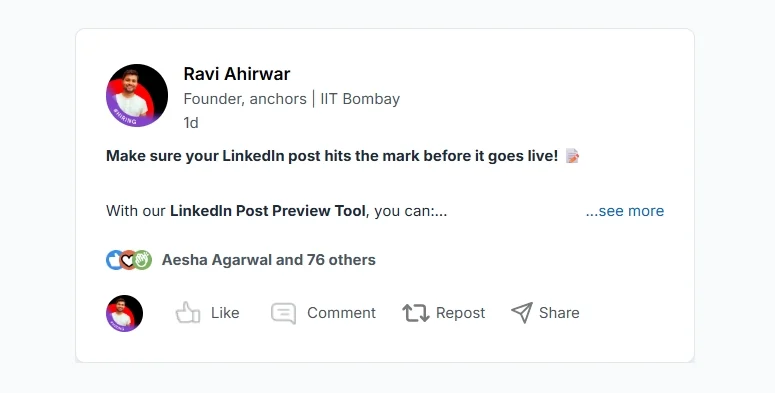
Check how your post looks on desktop screens with more horizontal space. Verify that formatting, emojis, and links display correctly across different screen sizes and devices.
Powerful Use Cases
See how professionals use our tool to streamline their LinkedIn strategy.
Weekly Content Planning
Plan your entire week of LinkedIn posts, save unique links for each post, and publish them on schedule without leaving the tool.
Team Collaboration
Generate shareable links and send them to colleagues or seniors for review. Get feedback and suggestions before publishing.
Direct Publishing
Once approved by your team, publish content directly to LinkedIn from the tool. No need to copy-paste or switch platforms.
Content Campaigns
Create multiple variations of posts, share with stakeholders for feedback, and publish the best version directly to LinkedIn.
Paid & Free Collaborations
Write content for brand partnerships and sponsored posts. Generate unique links for partners to review, suggest changes, and approve—all without sharing your account access.
Built for Every Role
Whether you're a creator, marketer, founder, or investor, this tool works for you.
Content Creators
Format and preview posts before publishing. Generate shareable links to get feedback from your audience.
Marketing Teams
Collaborate on content, get approvals from team members, and maintain brand consistency across posts.
HR Professionals
Create company announcements, job postings, and culture posts with professional formatting.
Sales Professionals
Craft engaging posts to build your personal brand and generate leads on LinkedIn.
Founders
Test hooks, verify links, and publish clean content that represents your vision and leadership.
Investors
Share market insights, investment theses, and thought leadership with precision and polish.
Powerful Features for Content Creators
Everything you need to create, preview, and publish professional LinkedIn content.
Rich Text Formatting
Bold, italic, underline, bullet points, numbered lists, and emoji support for professional content.
Live Preview
See exactly how your post will look on LinkedIn before publishing with real-time updates.
Shareable Links
Generate unique URLs to share posts with colleagues, seniors, and team members for feedback.
Team Collaboration
Receive suggestions and changes from reviewers directly in the tool.
Direct Publishing
Publish approved content directly to LinkedIn without leaving the platform.
See More/Less Toggle
Preview how your post appears with the LinkedIn see more/less functionality.
How It Works
A simple 5-step process to create and publish professional LinkedIn content.
Write & Format
Create your LinkedIn post using our rich text editor with formatting options.
Preview
View your post exactly as it will appear on LinkedIn with live preview.
Share for Review
Generate a unique shareable link to get feedback from your team.
Collaborate
Receive suggestions and make changes based on team feedback.
Publish
Publish your approved content directly to LinkedIn with one click.
Why Use Our LinkedIn Preview Tool?
Designed for professionals who want to create impactful LinkedIn content.
Save Time
Create and publish posts faster with our streamlined workflow and formatting tools.
Team Collaboration
Get feedback from colleagues and seniors before publishing to ensure quality content.
Better Engagement
Well-formatted, professionally crafted posts get more engagement on LinkedIn.
Quality Control
Review and approve content before publishing to maintain brand consistency.
Frequently Asked Questions
Everything you need to know about our LinkedIn Post Preview tool
Can I preview my LinkedIn post before publishing?
How do I generate a shareable link for feedback?
Can I publish directly to LinkedIn from this tool?
Is this tool really free? Do I need a credit card?
Can I use this for brand collaborations?
What formatting options are available?
Can I save my posts as drafts?
How many people can review a shared link?
Is my content private when I share a link?
Can I schedule posts for later?
Why we built this tool
We created this LinkedIn post preview tool with a clear purpose: to help content creators, founders, marketers, and anyone posting on LinkedIn see exactly how their posts will appear in the LinkedIn feed. This tool ensures that your most engaging content, a.k.a hook line, stays above the 'see more' cut-off, optimizing visibility and audience engagement.
While many LinkedIn preview tools exist, most fall short on accuracy of this cut-off line, making it hard for users to optimize their posts.
Originally, we built this tool for internal use, giving content creators a reliable way to preview posts and align content with brand guidelines during collaborations. However, after seeing the gaps in other preview tools, we decided to make ours public, completely free.
Our goal is to provide a LinkedIn preview tool that’s simple, accurate, and easy to use. If you encounter any glitches or have feedback, please reach out via email. We’re committed to continuously improving your experience with the tool.
Empowering Creators at Every Stage
anchors is designed to empower creators at every stage of their journey, giving you the tools, community, and insights to succeed in the creator economy. Here’s how we support you:
- Effortless Brand Collaborations: Get matched with verified brands that align with your values and audience—no negotiations needed. Authentic partnerships simplified.
- Performance-based Earning: Our unique performance-based earnings model means your income grows with the success of your posts. With our LinkedIn Pricing Calculator, you can also see your potential earnings and set informed rates for each brand collaboration.
- Connect with Creators in your City: Through “City Chapters”, we bring creators together in their own cities, creating local communities for connection, collaboration, and mutual support. It’s the perfect way to build local connections within the community.
- Access a Supportive Creator Community: Join a nationwide network of fellow LinkedIn creators, where you can exchange ideas, gain insights, and collaborate on projects for growth and learning.
- Get Real-Time Insights and Analytics: Understand your audience better with insights that guide your growth, helping you stay on top of trends and increase your reach.
anchors isn’t just another platform – it’s a place where creators can grow, connect with others, and reach their goals. Join us to find new ways to share your voice, make an impact, and earn what you deserve.